 VIEW PROJECT ↗
Healthcare · Mobile App
Grupo RIO
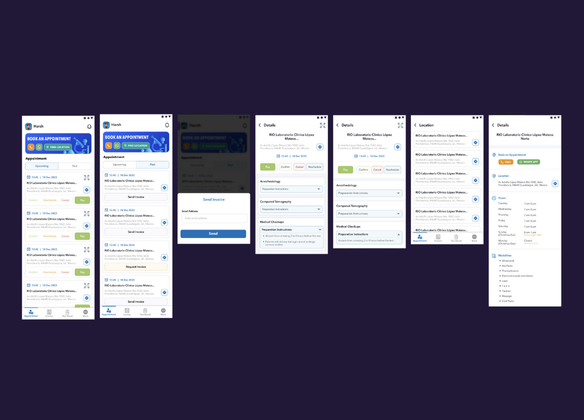
A mobile app for a health care app in Mexico streamlining the process of appointment booking, payments and viewing test results.
See what we built ↗SOLUTION / CUSTOMER PORTALS
A customer portal puts progress, documents, and next steps in one place, so clients do not have to ask your team for every update.
We build a secure, role-based workspace around what your customers actually need to see and do. Your internal tools can remain the place your team works.
Discuss your customer portal ↗30 minutes with Harsh. Bring the process, not a technical brief.
HOW THE WORK MOVES
Publish the agreed milestones and files from your working systems.
Make progress, documents, and requests easy to find within their own workspace.
Record the approval or upload and notify the person responsible for the next step.
EXPLORE AN EXAMPLE
Open the design brief and approve it to see how the next project step changes.
NORTHLINE / WEBSITE PROJECT
Waiting for your approval
Approve the direction so your team can move into the build.
DESIGN BRIEF / V1
Try opening the brief and approving it.
WHAT CHANGES FOR YOUR TEAM
Start with the updates customers repeatedly ask for. Give them a clear view of progress without exposing your internal notes, other clients, or unfinished work.
OUR WORK
Explore the software we’ve built for our clients.
VIEW PROJECT ↗Healthcare · Mobile App
A mobile app for a health care app in Mexico streamlining the process of appointment booking, payments and viewing test results.
See what we built ↗A DEFINED FIRST PROJECT
Build the smallest useful portal: a login, a status view, and one action such as approving a document. Expand after your clients have used it.
AGREED BEFORE YOU COMMIT
You approve the deliverables, price, timeline, and running costs before paid work starts.
Discuss your first project ↗BEFORE WE BUILD
Not necessarily. A portal can show a client-friendly view of selected information from your existing system, while your team keeps working there.
Yes, that is a core requirement. We scope roles and data access, then test those boundaries before launch.
Yes. We can include uploads, requests, and approvals in the agreed scope. File permissions, storage, and the internal handoff are defined alongside the screens.
We design the web portal for desktop and mobile use. If you need a separate native mobile app, we scope that as a different deliverable.
Sometimes. We compare your workflow with off-the-shelf options before recommending custom development. A custom portal makes sense when the required experience or integrations are not covered.
You own the code we build for you. Hosting, storage, third-party services, and optional support are identified separately from the build cost.
LET’S LOOK AT YOUR PROCESS
Show us the updates, files, and approvals that should be easier to find.
30 minutes with Harsh. No obligation.